




How to Avoid Eye Strain When Playing Word Search Games
Word search and word find puzzles are relaxing on screen, but long stretches of staring at small letters can tire your eyes. Whether you play one quick grid or stack several word search puzzle games back to back, a few comfort habits keep scanning enjoyable instead of uncomfortable.
Why Eye Strain Happens During Word Search Games
Eye strain often builds when you lock focus on fine text without pauses or enough ambient light.
Common Causes
- Long periods reading small letters in a dense grid
- Dim rooms or harsh glare on the display
- Screen brightness or contrast set too high for the space
- Reduced blinking while you hunt for the next word
Sweeping your eyes row by row across a word search grid is demanding work—fatigue accumulates if you never change focus or distance.
Use Proper Screen Brightness and Contrast
Small tweaks to display settings often matter more than buying new gear.
Helpful Adjustments
- Lower brightness in dark rooms; raise it slightly in bright daylight
- Increase contrast enough that letters separate clearly from the background
- Avoid a full-screen blast of pure white behind the grid
Comfortable levels let you stay on a word search puzzle longer without that tight, dry feeling behind your eyes.
Take Regular Breaks
Scheduled rest is one of the simplest protections against screen fatigue.
Simple Break Techniques
- Use the 20-20-20 rule: every 20 minutes, look at something about 20 feet away for 20 seconds
- Stand up or look away from the puzzle between grids
- Close your eyes for a few breaths when your vision feels flat or blurry
Even brief breaks reset focus so the next pass across the board feels sharper.
Maintain Proper Viewing Distance
Holding a phone inches from your face or hunching toward a monitor multiplies strain.
Recommended Practices
- Keep phones and small tablets roughly 30–40 cm (about an arm’s length) away
- Position desktop screens so you are not leaning in to read the word list
- Use a stand or prop so the device stays at eye level instead of your lap
Stable distance keeps letter shapes clear without squinting through an entire word search session.
Optimize Font Size and Grid Visibility
Unreadable grids force your eyes to work harder than the puzzle itself.
What You Can Do
- Zoom the page or use in-game size controls when they are available
- Pick larger grid presets on dense puzzles if the app offers them
- Increase system text scaling on phones and tablets
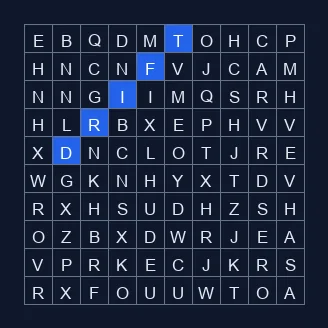
Larger, high-contrast letters make diagonal and straight paths easier to trace; if the grid looks like a gray blur, adjust zoom before you blame your eyes.
Sharp edges on each cell reduce the micro-adjustments that wear you out during long word search play.
Improve Lighting Conditions
Your room sets how hard the screen has to fight for your attention.
Best Lighting Practices
- Skip playing in complete darkness with only the grid lit
- Add soft ambient light so your pupils are not pinned wide open
- Angle lamps so they do not reflect across the puzzle area
Balanced lighting keeps contrast on the letters instead of on glare spots.
Blink More Often
Concentration on a word list quietly cuts your blink rate, which dries the surface of the eye.
Why Blinking Matters
- Spreads tears that keep the cornea lubricated
- Cuts down on grittiness and burning after long sessions
- Helps refocus when letters start to swim
A deliberate blink every few found words is a low-effort habit that pays off on marathon word search puzzle games.
Limit Continuous Play Time
Marathon runs without stops are when discomfort turns into next-day fatigue.
Smart Play Habits
- Split play into shorter blocks instead of one endless session
- Alternate puzzles with non-screen tasks when you can
- Stop as soon as you notice headache, pressure, or double vision
Pacing protects both your eyes and your enjoyment of word search games over weeks and months.
Final Thoughts
Eye strain is largely preventable. Match brightness to your room, rest on a timer, keep a sane viewing distance, enlarge the grid when you need to, and light the space around the screen—not only the puzzle. Those habits let word search and word find play stay a calm break rather than a chore for your eyes.
Frequently Asked Questions
Does playing word search on a phone cause more eye strain than on a desktop?
Phones often sit closer to your face and use smaller type by default, which can increase strain. Use zoom, increase display text size, and hold the device farther away than you would for casual scrolling.
Is the 20-20-20 rule enough between word search puzzles?
It is a solid baseline for any screen work, including word search puzzle games. Combine it with full blinks and a stand-up break between grids when a session runs longer than twenty minutes.
Should I lower brightness or raise contrast for letter grids?
Usually both, in moderation: brightness should match the room, and contrast should make letters distinct without glowing halos. If whites feel harsh, dim brightness first, then nudge contrast until edges look crisp.
When should I stop playing and rest my eyes?
Pause when you feel dryness, headache, blurred vision, or trouble refocusing on the word list. Continuing rarely helps you find more words—it mostly deepens fatigue.