




How to Play Word Search Puzzle Games
A word search puzzle (also called a word find) gives you a letter grid and a word list. Your job is to find every listed word along a straight path through the grid—horizontal, vertical, or diagonal, forward or backward when the rules allow. The rules are easy to learn; a short routine for reading the list, scanning the grid, and marking finds makes early puzzles feel much smoother.
This guide walks through that routine: what counts as a valid word, how to work through the grid step by step, and beginner habits that reduce missed words and repeat searching.
Understanding the Basic Concept
Every puzzle has two parts:
- A grid filled with letters (plus filler letters that are not part of the list)
- A list of words you must locate inside the grid
Each hidden word occupies one unbroken line of adjacent cells. You are not solving clues and filling empty squares like in a crossword—you trace letters that are already on the board.
Typical puzzles allow up to eight directions: left-to-right, right-to-left, top-to-bottom, bottom-to-top, and the four diagonals. Easier sets often use only horizontal and vertical words; harder puzzles add diagonals and reversed spellings. Check the instructions once so you know which directions are in play.
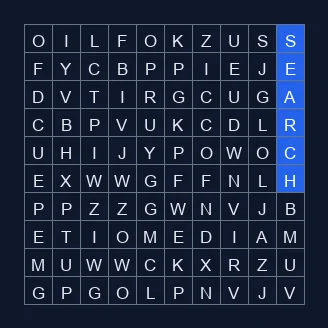
When you find a word, mark the full path—highlight, drag-select, or underline—so you can see what is left on the list.
Step-by-Step How to Play
The flow below works for print puzzles and digital word find games alike.
Step 1: Read the Word List Carefully
Before you scan the grid, skim every word on the list. That gives you a quick sense of lengths, shapes, and odd spellings so nothing on the list catches you off guard mid-scan.
Notice especially:
- Long words (they cover more cells on the grid and usually stand out once you start looking)
- Unusual letter pairs (for example QU or PH)
- Double letters (LL, EE, and similar)
Step 2: Scan the Grid Systematically
Random eye jumps miss lines. Pick a pattern and stick to it for that puzzle.
Common approaches:
- Row-by-row from top to bottom
- Column-by-column from left to right
- One quadrant or block at a time on large boards
Cover the whole grid at least once before you assume a word is missing.
Step 3: Look for Unique Letters First
Rare letters narrow the search fast. When you spot Q, X, or Z, trace each allowed direction from that cell to see whether a list word completes.
Double letters and distinctive endings (such as -ING or -TION) work the same way: they stand out among filler letters.
Step 4: Match Word Shapes Instead of Spelling Letter by Letter
Experienced players read chunks—prefixes, endings, and the overall silhouette of a word—rather than checking every cell in isolation.
Useful habits:
- Lock onto a strong first letter, then fan out in all legal directions
- Confirm a candidate by matching the full spelling along one straight line
- On diagonals, follow the same slope; a real word keeps the same step row-to-row
Step 5: Mark Words as You Find Them
Cross each word off the list and mark the grid the moment you confirm a match. That prevents duplicate hunts and keeps the remaining count accurate.
On screen, drag or tap from the first letter to the last along the word’s path. On paper, circle or underline the full line.
Common Directions Words Can Appear
Words are not always left-to-right across a row. In a full-rule word search, the same answer might run upward, backward, or on a diagonal.
In practice you may see:
- Forward along a row or column
- Backward along that same line
- Vertical lines (up or down)
- Diagonal lines in any of the four diagonal directions
Some puzzles restrict the set (for example horizontal and vertical only). Treat the puzzle’s rules as final—do not assume every direction is allowed on every board.

The eight straight-line directions; beginner puzzles often omit diagonals or backward words until you are comfortable.
Helpful Strategies for Beginners
These tactics pair well with the step-by-step flow above.
Start with Longer Words
Long entries cover more cells, so they pop out of the background. Clearing them first also crosses off more letters that might have looked like false starts for shorter words.
Focus on the First Letter
For each word, search for its opening letter (or its rarest letter), then test every permitted direction from that cell until the full word matches or you rule that anchor out.
Break the Grid into Sections
On large puzzles, treat the board as smaller patches. Finish one patch before jumping elsewhere so you do not leave gaps between scan passes.
Stay Patient and Consistent
Early play is about coverage, not speed. Steady scanning beats rushing, which tends to skip rows and reverse paths.
Differences in Digital Word Search Games
Digital word search games follow the same core rules. The interface may add:
- Automatic highlighting when a path is valid
- Hints that reveal a first letter or word
- Optional timers and difficulty tiers
Those tools help you learn, but the skill underneath is still visual scanning and pattern recognition—the same as on a printed page.
Developing Your Own Style
After a dozen puzzles you may prefer strict row scans, anchor hunting on rare letters, or tackling the longest words first. All of those are fine if they help you finish lists without fatigue.
The best method is the one you can repeat puzzle after puzzle.
A Simple Game with Clear Goals
A word search is a closed task: a fixed list, a fixed grid, and a clear finish line when every word is marked. That simplicity is why the format works for quick breaks and longer sessions alike.
When you want fresh lists and grids, try themed word search puzzles here or put together a custom puzzle with a word list that fits your mood or practice goal.
Frequently Asked Questions
Do I need to memorize every word before I start?
No. Read the list once, then use length, first letters, and rare letters as handles even when a meaning is new. Themed lists often teach vocabulary as you play.
Are word search puzzles the same as crosswords?
No. Crosswords rely on clues and blank cells to fill in. Word search puzzles only ask you to find whole words already placed on straight paths in the letter grid.
Can words overlap in the grid?
Yes. Letters are often shared between two words that cross paths. Marking one word correctly does not remove those letters from the board for other answers.
Is speed important when you are learning?
Accuracy comes first. Finish the list cleanly; if you want more pace later, shorten breaks between words after your scanning pattern feels automatic.