




How to Scan a Word Search Puzzle Grid Efficiently
Fast, accurate word search and word find play depends less on luck than on how you move your eyes across the grid. A repeatable scan path covers every cell once, cuts duplicate passes, and leaves more attention for the word list—straight-line paths in a letter field, not crossword-style fill-ins.
This guide walks through practical scanning patterns, sectioning, pacing, and habits that make large grids feel manageable.
Start With a Clear Scanning Pattern
Efficient scanning starts with consistency. Random hops across the board leave bands unchecked and invite repeat looks at the same letters.
Common methods
- Row passes from top to bottom
- Column passes from left to right
- A tight zigzag when you want one continuous line through the grid
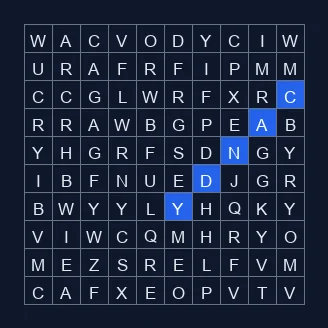
One highlighted path on a sample grid shows what disciplined coverage means: finish a direction through the letters before you jump to another angle. That habit limits blind spots and wasted second passes.
Pick one primary pattern per puzzle and run it to completion before you improvise.
Break the Grid Into Smaller Sections
Large boards overwhelm when you treat them as a single blur. Mental chunks keep focus sharp.
What helps
- Divide the grid into quadrants or horizontal bands
- Finish one section before you open the next
- Note mentally which zones already had a full pass
Sectioning lowers cognitive load and makes it obvious what still needs coverage.
Use a Consistent Starting Point
The same entry point every time builds rhythm and prevents arguing with yourself mid-puzzle.
Popular choices
- Top-left corner
- First row or first column
- A fixed corner paired with your chosen row-or-column order
A stable start keeps structure intact when the list grows long or the grid is dense.
Scan for First Letters First
Matching the full word on every cell is slow. Anchoring on openings narrows the field fast.
How to apply it
- Sweep for a target starting letter from the list
- When one lands, check every allowed straight direction from that cell
- Confirm the full spelling before you mark it found
First-letter hunts pair well with your main row or column pass instead of replacing it.
Look for Letter Clusters, Not Isolated Cells
Experienced players read patches of letters, not single glyphs one at a time.
Examples to watch
- Frequent pairs such as TH, ER, or IN from your word list
- Vowel runs that match list entries
- Unusual groupings that jump out against filler
Cluster reading speeds detection without sacrificing the systematic pass underneath.
Use Direction Awareness While Scanning
Coverage is only half the job; each band also needs the orientations your puzzle allows.
Train yourself to notice
- Horizontal lines as you finish each row
- Vertical stacks when you run columns
- Diagonal streaks without stopping the sweep for a full decode
Run the same direction checklist on every section so one orientation does not stay invisible until the end.
Avoid Re-Scanning the Same Area
Duplicate passes are the quietest time sink in word search puzzle games.
Stay on track
- Mark found words on the list and grid when the UI allows it
- Remember which sections already had a complete pass
- Advance systematically instead of jumping back to “favorite” zones
Tracking coverage turns scanning into forward progress, not loops.
Adjust Scanning Speed Based on Complexity
Not every region deserves the same pace.
Flexible pacing
- Slow down where letters crowd or words overlap
- Glide through sparse bands after a confident pass
- Match speed to how many list words still hide in that zone
Variable tempo keeps accuracy high without turning the whole grid into a crawl.
Use Peripheral Vision for Faster Detection
Your fixation point does not have to sit on every cell for useful information to register.
Where it helps
- Long list words read as streaks beside your main scan line
- Odd clusters trigger a focused second look without halting the sweep
- Diagonal or reversed shapes get flagged before you decode them letter by letter
Peripheral glances support the main pattern; they do not replace a finished pass.
Combine Scanning With Pattern Recognition
Structure and shape sense multiply each other.
As you scan
- Notice familiar silhouettes from the word list
- Spot repeating letter structures tied to theme words
- Anticipate where a straight path could land before you read every cell
When pattern work rides on top of a fixed path, scanning feels faster without getting sloppy.
Efficiency Comes From Structure, Not Speed
The goal is a method you can repeat puzzle after puzzle—not frantic hopping.
Consistent patterns, logical sections, anchor letters, cluster reading, and honest pacing compound over time. With practice, a word find grid becomes a sequence of familiar moves instead of a fresh fight every round.
Frequently Asked Questions
Is row-by-row or column-by-column scanning better?
Neither wins universally. Rows suit wide boards and horizontal-heavy lists; columns help when many words run vertically. Pick one as your default pass and add the other when a section stalls.
How do I scan a very large grid without missing corners?
Use quadrants or bands and finish each chunk before you move on. Pair that with one stable starting corner so edge rows and columns always sit inside a named zone.
Should I hunt one word at a time or scan the whole grid once?
Blend both: run your full-grid pass for coverage, and use the word list to target first letters or distinctive clusters when a pass stalls. Pure one-word staring usually leaves holes elsewhere.
Does scanning speed matter for beginners?
Speed matters only after coverage is reliable. Nail a repeatable path and marking habit first; tempo naturally rises as patterns and directions feel automatic.
How is efficient scanning different from randomly looking around?
Random search re-reads the same cells and skips bands without you noticing. A fixed pattern, section markers, and list tracking guarantee every zone gets attention once per cycle.