




How to Improve Visual Scanning for Word Search Games
Strong visual scanning turns word search and word find grids from a blur of letters into something you can cover reliably. It is the skill behind steady row-and-column sweeps, quick pattern reads, and fewer words left hiding in plain sight—straight-line list puzzles on a letter grid, not crossword-style clues.
This guide explains what visual scanning means in play, how to train it step by step, and how to keep accuracy up as grids grow harder.
Understanding Visual Scanning
Visual scanning is how your eyes move across a field to find specific targets. In word search puzzle games, that usually means:
- Following a deliberate path across rows, columns, or sections
- Spotting letter sequences that match list entries before you read every cell
- Keeping track of which zones already had a full pass
Good scanning habits catch words in every allowed direction, including reverse or diagonal lines, without treating the board as a random jumble.
Start With a Methodical Approach
Structure beats speed early on. A repeatable scan path makes sure no band of the grid goes unchecked.
Habits that stick
- Run row-by-row or column-by-column passes and finish one before you switch
- Work small chunks—quadrants, bands, or blocks—so the board stays mentally manageable
- Use a finger, stylus, or cursor to pace the line so your eyes do not skip ahead
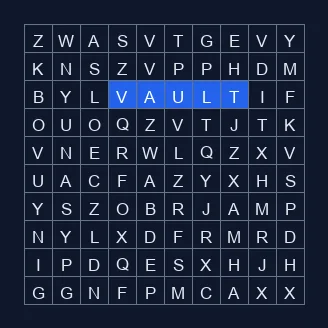
One highlighted word on a sample grid shows what steady coverage looks like: complete a line through the letters, mark progress, then move to the next band. That rhythm is the core of visual scanning in word find play.
Methodical coverage is the foundation every other technique builds on.
Train Pattern Recognition
Once a scan path is automatic, pattern sense does the fast filtering. You still move systematically, but your brain flags promising letter runs before you spell them out cell by cell.
What to practice
- Prefixes, suffixes, and frequent pairs from your current word list
- Unusual letter clusters that stand out against random filler
- Overlapping paths—when one found word shares cells with another still on the list
Pattern training cuts dwell time on empty filler and keeps your main sweep moving forward.
Use Peripheral Vision
You do not need a hard stare on every letter for useful information to register. Peripheral awareness supports the primary scan line.
Practical use
- Let longer list words read as streaks beside your fixed row or column pass
- Notice odd clusters that trigger a focused second look without stopping the sweep
- Flag diagonal or reversed shapes as candidates before full decoding
Peripheral glances complement structure; they do not replace finishing each section you planned to cover.
Practice With Increasing Complexity
Scanning improves like any motor skill—through repetition and gentle progression.
Sensible steps
- Start on smaller grids with shorter lists until a full pass feels natural
- Add density, longer words, and more directions as confidence grows
- Revisit the same scan pattern on harder boards instead of inventing a new hop each time
Regular practice wires eye movement to habit, so harder word search puzzle games feel like familiar work at a larger scale.
Avoid Fatigue and Maintain Focus
Visual accuracy drops when eyes and attention tire. Scanning quality matters more than marathon sessions.
Keep performance steady
- Take short breaks on long puzzles or timed rounds
- Reduce distractions so one pass is not competing with side tasks
- Use comfortable lighting and posture, especially on small screens
Alert scanning stays precise; rushed scanning after fatigue is where hidden words survive.
Stronger visual scanning comes from deliberate method, pattern drills, and honest pacing—not from staring harder at the same random corners. Build the habits above on grid after grid, and word search play tends to feel faster, calmer, and more complete.
Frequently Asked Questions
How is visual scanning different from just looking around the grid?
Looking around re-reads favorite zones and skips others without you noticing. Visual scanning is a planned path—rows, columns, or sections—run to completion so every cell gets attention at least once per cycle.
Can peripheral vision replace systematic scanning?
No. Peripheral cues help you notice candidates faster; you still confirm words on a straight allowed path. Drop the main pattern and words hide in gaps you never formally covered.
How long does it take to improve visual scanning?
Many players feel a difference within a few focused sessions once they pick one default pass and stick to it. Bigger grids and denser lists reward the same habits over weeks of casual play.
Should beginners scan row by row or column by column first?
Either works if you finish the direction you choose. Rows suit wide boards; columns help when list words skew vertical. Pick one default and add the other when a section stalls.
Does screen size affect visual scanning?
Smaller screens compress letters; sectioning and pacing matter more. Larger views can tempt wider sweeps—use the same chunk sizes so edges and corners stay inside named zones.