




Word Search on Mobile vs Desktop
Word search and word find puzzles play the same on every device: you trace straight paths through a letter grid to clear a word list—nothing like crossword clues or fill-in boxes. What changes is the hardware. Phones and tablets suit quick sessions; desktops and laptops suit long runs on large or dense boards. Comfort, speed, and how you drag a highlight all shift with screen size and input type.
Gameplay Experience Overview
The core puzzle is identical; the difference is how you mark a found word.
Mobile Experience
- Played on phones or tablets
- Words are selected with tap-and-drag on a touchscreen
- Built for short, on-the-go rounds
Mobile word search often feels casual: open the app, finish one grid, stash the device.
Desktop Experience
- Played on a computer with mouse or trackpad
- Words are selected with click-and-drag
- Better for longer, uninterrupted focus
Desktop word find layouts usually expose more of the grid and word list at once.
Screen Size and Visibility
How much of the board fits on screen shapes how hard you work to stay oriented.
Mobile Devices
- A smaller viewport may hide part of a large grid
- Zoom and scroll eat time on dense puzzles
- Fine letter detail is harder to read at a glance
Desktop Devices
- A wide monitor often shows the full grid without panning
- Row-and-column sweeps stay in view together
- Less hunting for the edges of the board
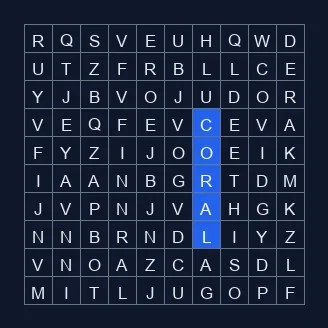
On a big screen, a dense word search grid like this can sit in one view—every cell readable while you compare the list to straight highlighted paths. On a phone, the same board may need pinch-zoom or scrolling to match that overview.
That visibility gap is why many players move difficult word search puzzle games to a larger display.
Control and Interaction Style
Touch and pointer input feel different even when the rules do not.
Mobile Controls
- Touch is fast once you are used to it
- Fat-finger mistaps happen on tight cells
- Long diagonal drags need a steady finger path
Desktop Controls
- A mouse or trackpad supports finer end points
- Long or diagonal highlights are easier to stop cleanly
- Accidental selections are less common
On any platform, clean drags along a word’s letters save retraces and keep momentum.
Portability vs Stability
Each format trades mobility against a fixed, comfortable desk setup.
Mobile Advantages
- Play anywhere—commute, waiting room, couch
- Ideal for one-grid breaks
- No login ritual beyond unlocking the device
Desktop Advantages
- Stable viewing distance and posture
- Easier multitasking with a word list beside other windows
- Fewer battery and notification interruptions if you mute the phone
Pick mobile when time is sliced thin; pick desktop when you want the board to stay put.
Gameplay Speed and Efficiency
Device limits show up most on big or crowded grids.
Mobile Gameplay Speed
- Small boards feel snappy
- Heavy grids may lag or stutter on older phones
- Scrolling between grid zones breaks scan rhythm
Desktop Gameplay Speed
- More letters visible speeds pattern spotting
- Structured passes (row by row, then columns) stay coherent
- High-difficulty word search games benefit from steady mouse flow
Neither side “wins” every puzzle size—match the device to how much screen real estate the grid needs.
Comfort and Eye Strain
Ergonomics matter when word find becomes a habit, not a one-off.
Mobile Comfort
- Tiny type strains eyes faster than desktop defaults
- Holding a phone low or close encourages neck tension
- Glare and auto-brightness shifts distract mid-scan
Desktop Comfort
- Monitor height can align with natural gaze
- Larger default text reduces squinting on long sessions
- Keyboard trays and chairs support hour-long play more easily
If your eyes fatigue, bump text size or move to a bigger screen before blaming the puzzle difficulty.
Choosing the Right Platform
There is no single best device—only what fits your schedule and puzzle appetite.
When Mobile Is Better
- Five-minute mental breaks
- Travel or waiting without a laptop
- Casual word search on easy or medium grids
When Desktop Is Better
- Large grids, long word lists, or timed challenges
- Players who want the whole board visible
- Sessions where precision and comfort outweigh portability
Many people use both: phone for a daily quick grid, desktop for themed marathons.
Final Thoughts
Mobile word search wins on convenience; desktop wins on visibility, control, and endurance. The puzzle itself—straight paths through a shared letter grid—does not care which you choose. Match the platform to session length and grid size, and you get the same calm list-clearing satisfaction either way.