




How Screen Size Affects Word Search Games
The device you use shapes how comfortable a word search or word find session feels. Screen size changes how much grid you see at once, how sharply letters read, and how accurately you can mark a path. Once you know those tradeoffs, you can pick puzzles and habits that fit phones, tablets, and desktops without fighting the display.
Larger Screens Enhance Visibility
Tablets and desktop monitors usually make word search puzzle games easier on the eyes and faster to scan.
Benefits of Larger Screens
- Letters stay readable without squinting across a dense grid
- More rows and columns stay on screen at once
- Straight-line passes feel smoother, with fewer mis-clicks along a word
That extra room helps on challenging puzzles—big grids, long list words, or themes that pack letters tightly.
Smaller Screens Require Adjusted Strategies
Phones and compact devices reward a different rhythm than a wide monitor.
Challenges on Small Screens
- You may need to scroll to see the full board
- Tiny type slows hunting and invites skipped cells
- Touch or drag selection is easier to misalign
Practical habits help: clear short anchors first, scroll in fixed bands instead of random jumps, and use pinch-zoom or in-app size controls before you blame the puzzle.
Make Letters Large Enough to Scan
Unreadable cells waste the advantage of portability.
- Zoom the grid until each letter has a clear edge, then scroll if needed
- Raise system or in-game text size when the word list shrinks too
- On timed modes, pick a preset you can read cleanly—not the smallest grid the app offers
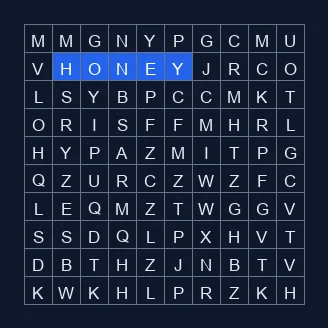
On a narrow screen, enlarging the grid like this keeps each cell legible; if you still chase letters one at a time, zoom further or switch to a less dense puzzle.
When characters stay sharp, small-screen word search stays playable instead of visually exhausting.
Orientation and Layout Considerations
Landscape and portrait change how much grid fits beside the word list.
Landscape vs Portrait
- Landscape often shows more columns, which can cut horizontal scrolling
- Portrait can suit top-to-bottom sweeps but may hide long rows until you scroll
- Switch orientation when one view traps you in endless sideways drags
Match orientation to what the puzzle demands that session—not every title benefits from the same default.
Cognitive Load and Eye Strain
A cramped view asks your brain and eyes to do extra work.
Effects on the Player
- Small displays increase attention shifting—grid, list, then grid again
- Crowded letters plus glare can produce fatigue faster than on a large monitor
- Roomier screens support longer, calmer word find play with fewer hard stops
Pair screen habits with breaks and sensible lighting; screen size is one part of comfort, not the whole story.
Accessibility and Device Preferences
Display size matters for who can enjoy word search puzzles without strain.
Practical Considerations
- Younger players and anyone with low vision often do better on tablets or scaled-up phone settings
- Portable devices win on convenience; plan for zoom and shorter sessions
- Built-in magnification, high contrast themes, and larger tap targets help when letters stay small
The right setup turns a fiddly phone grid into a relaxed search instead of a frustration loop.
Grid Complexity and Screen Compatibility
Dense puzzles amplify every screen limitation.
Grid Size Implications
- Overlapping words and tight filler read better when you see more cells at once
- Bigger views make diagonal or backward patterns easier to hold in mind
- On phones, very large boards may force sectional play—slower but still fair
Choose grid density that matches your device for that day; there is no shame in downsizing when readability drops.
Flexibility Across Devices
Word search puzzle games remain playable almost everywhere if you adapt the interface, not only your strategy.
Tips for All Devices
- Zoom so the grid and list both stay comfortable without constant refocus
- Scroll in planned strips—rows, columns, or corners—instead of wandering the board
- Favor accuracy in selection over speed when the display fights your finger or cursor
With those tweaks, smartphone, tablet, and desktop sessions can all feel deliberate and fair.
Final Thoughts
Screen size influences visibility, pace, comfort, and accessibility in every word search session. Large displays usually support faster, lower-strain scanning; small ones ask for zoom, orientation changes, and patient sectional coverage. Match puzzle density to what you can read clearly, and the same straight-path rules work on any hardware.
Frequently Asked Questions
Is word search easier on a tablet than on a phone?
Often yes, because you see more grid at once and letters render larger by default. Phones still work well if you zoom, enlarge text, and avoid the densest boards during long sittings.
Should I play word search in landscape or portrait?
Use whichever orientation shows more of the puzzle area you sweep most—wide rows favor landscape on many layouts; tall grids sometimes feel natural in portrait. Try both on your device rather than assuming one mode is always better.
Do small screens cause more mistakes when marking words?
They can, because smaller tap targets and partial views increase mis-selections. Zoom in, slow the final drag along each candidate path, and recheck edges after scrolling.
Can I play large grids on a phone?
Yes, but expect sectional scanning and more scrolling. If progress feels clumsy, switch to a medium grid or move to a larger screen for that puzzle.
Does screen size replace good scanning technique?
No. A big monitor helps, yet systematic passes along rows, columns, and allowed directions still find list words faster than random hunting—on any display size.