



What Makes a Word Search Puzzle Game Hard?
A word search or word find puzzle can look harmless until size, density, and list design stack up. Difficulty is rarely one switch—it comes from grid scale, how letters are packed, which straight directions count, vocabulary on the list, and how much overlap crowds the board. The core task stays the same: trace whole words along continuous lines in the grid, not crossword-style clue filling.
Knowing what pushes a board into “hard” territory helps you choose a fair tier and adjust scanning instead of brute-forcing random letter chains.
Large Grid Size Increases Search Complexity
The most visible step up is raw grid area.
As the field grows:
- More cells need coverage on every pass
- List words can land farther apart
- Eye movement and working memory work harder to hold context
Large grids reward sustained focus across the whole board, not just a quick center skim.
Dense Letter Arrangement Creates Visual Noise
Harder word search setups often leave few “quiet” columns—filler letters sit tight, and shared cells are common.
That density tends to:
- Blur visual separation between real words and decoys
- Increase misses when your eye jumps ahead
- Raise effort to confirm one clean straight path
When letters crowd every row, you interpret the grid more deliberately than you would on an open beginner board.
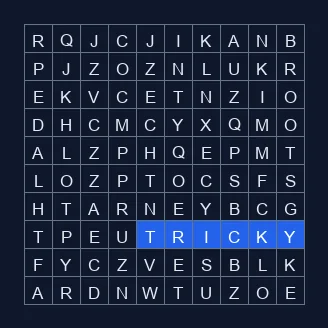
On a packed field, one confirmed straight path matters: “TRICKY” here stands in for tracing a full horizontal answer amid dense filler—exactly the kind of layout that slows casual scanning.
Multiple Word Directions Add Complexity
Easy word find puzzles often limit placement to rows and columns. Harder rules widen the search space.
You may face:
- Diagonal answers alongside horizontal and vertical lines
- Reverse spellings along an allowed straight path
- Mixed direction sets where every list word must be checked on each enabled axis
More permitted directions mean more orientations to test before you mark a word found.
Long and Unfamiliar Words Slow Down Recognition
List design alone can steepen the curve.
Tough word search grids often include:
- Longer entries that take more cells to verify
- Low-frequency or specialist vocabulary
- Themed jargon you do not see in daily reading
Without instant recognition, you rely on letter-by-letter confirmation instead of shape memory.
High Word Overlap Creates Confusion
Advanced layouts place many words through the same letters.
Overlap commonly causes:
- One cell belonging to multiple valid paths
- Partial matches that look right until the tail fails
- Extra passes to separate your current target from a crossing word
Each intersection adds a small verification step, and those steps add up on dense boards.
Similar Letter Patterns Reduce Visibility
Some grids repeat clusters that mimic word starts.
Examples include:
- Stacks of repeated vowels or consonants
- Common bigrams scattered everywhere
- Runs that look like prefixes but dead-end
Those distractions compete with real list spellings and can pull attention off-system.
Minimal Visual Clues Make Searching Slower
Easier puzzles sometimes leave breathing room—wider spacing or looser packing so words stand out. Hard versions compress that relief.
Players then see:
- Fewer natural visual breaks between zones
- Less predictable placement patterns
- Stronger need for row-by-row or column-by-column discipline
Without quick visual anchors, systematic coverage beats optimistic spotting.
Time Pressure Adds Mental Stress
Timed word search modes layer pace on top of visual load.
Under a clock you may:
- Scan faster at the cost of accuracy
- Skip edge rows or double-letter checks
- Feel stress that narrows attention
A timed hard grid is still the same puzzle rules—only the cost of hesitation rises.
Lack of Familiar Themes Increases Difficulty
Unfamiliar or abstract themes remove the “guess the list” shortcut.
Effects include:
- Slower prediction of likely spellings
- More cold tracing for every entry
- Less payoff from intuition between rare words
Animal or food lists feel gentler for many solvers than niche technical or abstract sets at the same grid settings.
Why Difficulty Feels Different for Each Player
Objectively dense boards still land differently person to person.
Perceived hardness tracks:
- Vocabulary and spelling comfort
- Visual scanning speed and stamina
- Experience with diagonal and reverse rules
- Attention to small mismatches along a path
Design sets the baseline; habits and background tilt how it feels on the day you play.
Understanding Difficulty Helps Improve Performance
Once you can name the pressure points, you can respond instead of just grinding.
Useful shifts include:
- Matching grid size and direction rules to your current skill
- Reading the full list first on unfamiliar themes
- Slowing overlap-heavy zones instead of rushing the count
- Practicing timed and untimed modes separately so pace does not blur accuracy
Hard word search puzzle games stay challenging by design—but the same factors you notice on a brutal board are the ones you can train against over time.