



Word Search Puzzle Game Difficulty Levels Explained
Word search and word find puzzles use difficulty labels so beginners, casual solvers, and veterans each get a fair match. The core rule stays the same: locate whole words along straight paths in a letter grid. What changes from tier to tier is grid size, list design, which directions are allowed, and how tightly words overlap—those levers stack into very different scanning load. This guide walks through common level names, what each tier tends to include, and how to pick a challenge that builds skill without burnout.
Beginner Level: Simple and Easy-to-Spot Words
Beginner boards target new players who are still learning steady eye movement and list tracking.
Typical features include:
- Small grids with readable spacing
- Short, familiar everyday words
- Mostly horizontal and vertical placement
- Light overlap so paths stay distinct
At this tier, the goal is confidence: you learn how the word list maps to the grid, finish puzzles without fatigue, and practice marking found entries before moving on.
Easy Level: Slightly More Variation
Easy puzzles add a little variety while staying approachable.
Common characteristics include:
- Medium-small grids
- A mix of short and medium-length list entries
- Occasional diagonal placement alongside rows and columns
- Simple themes such as animals, colors, or household objects
You still rely on quick recognition, but you begin alternating horizontal sweeps with vertical and simple diagonal checks.
Medium Level: Balanced Challenge
Medium difficulty is where casual eyeballing stops working as often. Boards need steadier attention and a bit of method.
Features often include:
- Larger grids and more letters per glance
- Higher word density on the same field
- Words in all allowed straight directions, including reverse spellings along a line
- Moderate overlap—shared letters without a fully packed feel
Pattern recognition and sectioned scanning matter more than spotting the first two letters and guessing the rest.
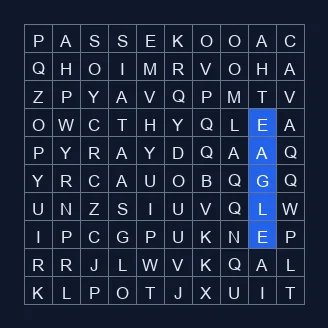
A single highlighted vertical path on a mid-difficulty board shows the shift from beginner play: you confirm a full word line on purpose before marking it off. “EAGLE” here stands in for checking one complete straight path while the surrounding grid already carries more shared letters.
Hard Level: High Complexity Grids
Hard word search puzzle games target experienced solvers who want longer focus blocks.
Typical features include:
- Large, dense letter fields
- Longer, rarer, or specialist vocabulary
- Frequent diagonals and reverse paths
- Heavy overlap and few visually “quiet” zones
These boards reward disciplined coverage: anchor letters, ignore decoy clusters, and recheck edges where reverse spellings hide.
Expert Level: Maximum Difficulty
Expert layouts push visual processing and patience to the limit.
They often include:
- Very large grids with dense filler
- Long lists with abstract, technical, or uncommon entries
- Heavy use of every allowed direction, including reverse along a line
- Minimal visual shortcuts—almost every zone needs a deliberate pass
At expert tier, advanced pattern work and efficient scanning plans separate a clean finish from a long hunt for the last few words.
Factors That Influence Difficulty
No single slider defines how hard a puzzle feels. Several design choices combine:
- Grid size: more cells mean more territory per word
- Word length: longer paths take more directional checks; very short words can hide in overlap
- Word placement: more allowed directions multiply where a spelling can sit
- Word density: more list entries in the same space raise visual noise
Reading the label plus these cues helps you interpret what “medium” or “hard” means on a given app or printout.
Theme Complexity and Word Familiarity
Vocabulary choice matters as much as geometry. Common everyday words shorten search time because your brain predicts spellings before your eyes trace them. Specialist, archaic, or foreign-theme lists add recall work even when grid settings look modest.
Themed word search games can be easy or brutal depending on whether you know the topic—not just on the difficulty badge printed on the cover.
How Difficulty Affects Strategy
As tiers step up, habits scale with them.
At higher levels, useful moves include:
- Fixed scan patterns instead of random jumps
- Deliberate attention to letter clusters and false starts
- List-first passes, then quadrant rechecks for stragglers
- Slower final verification instead of rushing the word count
On dense boards, strategy shares top billing with raw observation.
Choosing the Right Difficulty Level
Match the puzzle to today’s goal.
- New players: start on small grids with limited directions
- Intermediate solvers: choose balanced boards that stretch focus without marathon sessions
- Advanced players: pick large, dense layouts when you want a longer solve
Move up one notch at a time. Jumping from tiny warm-up grids straight to expert presets usually tanks accuracy more than it trains speed.
Difficulty Is Designed for Skill Growth
Difficulty tiers are not only about bragging rights—they outline a learning path.
As you progress through levels, you typically improve:
- Scan coverage and fewer missed pockets
- Reading letter order along full paths
- Pattern recognition under overlap
- Steady pacing without rushing the count
That progression keeps word find puzzles engaging after the first few clears.
Final Thoughts
From beginner grids with short words and two axes to expert fields stuffed with overlap and reverse paths, difficulty levels describe how much structure your eyes need—not a different game. Pick a tier that matches your energy, nudge harder when clean solves feel routine, and treat each step up as practice for systematic scanning rather than a test of luck.
Frequently Asked Questions
Are “beginner” and “easy” the same thing?
Not always. Some publishers use both labels for the gentlest tier; others treat beginner as tutorial-sized grids and easy as the first “real” size. Check grid dimensions and direction rules, not only the name.
Does expert mode always mean the biggest grid?
Usually, but not exclusively. A modest grid with every direction, a long obscure list, and dense overlap can play harder than a large board with familiar words and light overlap.
Why do longer words sometimes feel harder and sometimes easier?
Long entries often have distinctive letter pairs that stand out—until overlap and reverse placement bury them. Context matters more than length alone.
Is reverse spelling the same as backward scanning?
In standard word search rules, “reverse” means the letters of the word appear in reverse order along a straight line (right to left, bottom to top, and so on)—not that you read the grid backwards arbitrarily.
Can I stay on easy forever?
Yes. Easy and medium boards are valid for relaxation. Step up when you want training, not because a label tells you to.
Is word search the same as a crossword?
No. Crosswords fill blank cells from clues. Word search hides whole words along straight paths in a letter grid for you to find and mark.